

Introduction: Why WordPress Security Can’t Be Ignored
WordPress powers over 40% of the web, which makes it incredibly powerful—but also a prime target for hackers. I’ve personally worked with WordPress sites that were running perfectly one day and completely compromised the next, simply because basic WordPress security practices were overlooked.The misconception that “my site is too small to be hacked” is one of the most dangerous beliefs in the WordPress ecosystem. In reality, most attacks are automated, not targeted. Bots scan thousands of sites daily, looking for common vulnerabilities like outdated plugins, weak passwords, or misconfigured hosting environments.
In this article, we’ll break down the most common WordPress security vulnerabilities, explain why they happen, and—most importantly—share practical, proven solutions you can implement today. This isn’t generic advice; it’s based on real-world experience, current research, and best practices used by professionals.
Understanding WordPress Security: Core vs Human Errors
Before diving into vulnerabilities, it’s important to clarify something often misunderstood:
WordPress itself is not inherently insecure.
The core WordPress software is regularly audited and patched by a global team of security experts. The real issues usually come from:
- Third-party plugins and themes
- Poor configuration
- Human error
This distinction helps us focus on what actually needs fixing.
Common WordPress Security Vulnerabilities (And Why They Exist)
1. Outdated Plugins and Themes
This is the #1 cause of WordPress hacks.
Plugins and themes extend functionality, but each one adds new code—and potential vulnerabilities. When developers release updates, they often include security patches. If you don’t update, attackers can exploit known flaws.
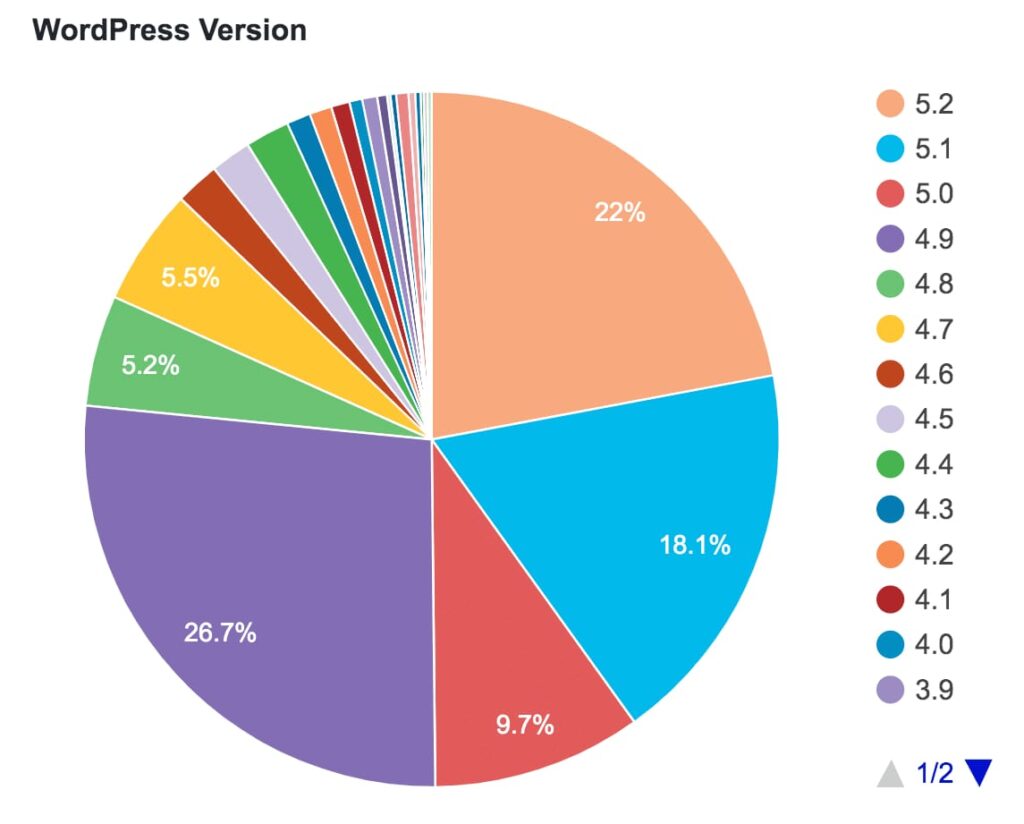
Why it happens:
- Site owners fear updates may break the site
- Too many unused plugins installed
- Lack of maintenance routine
Real-world insight:
I’ve seen sites hacked through plugins that were deactivated—but still installed. Deactivated does not mean safe.
2. Weak Login Credentials
Brute-force attacks remain one of the most common WordPress security threats. Bots attempt thousands of username/password combinations until they get access.
Common mistakes:
- Using “admin” as username
- Weak or reused passwords
- No login attempt limits
According to multiple security reports, compromised credentials account for a massive portion of WordPress breaches.
3. Poor Hosting Security
Not all hosting providers are created equal. Cheap or unmanaged hosting often lacks:
- Server-level firewalls
- Malware scanning
- Isolated environments
Shared hosting without proper isolation can allow one infected site to affect others on the same server.
4. Lack of HTTPS / SSL
Running WordPress without SSL means data is transferred in plain text. This makes login credentials and form submissions vulnerable to interception.
Google also flags non-HTTPS sites as “Not Secure,” which affects both trust and SEO.
5. File Permission Misconfigurations
Incorrect file and folder permissions can allow attackers to:
- Upload malicious files
- Modify core WordPress files
- Inject spam or malware
This vulnerability is especially common after manual installations or migrations.
6. No Web Application Firewall (WAF)
Without a firewall, your WordPress site is exposed directly to:
- SQL injection attempts
- Cross-site scripting (XSS)
- Malicious bots and crawlers
A WAF acts as the first line of defense, blocking threats before they reach your site.
Comparison: Secure WordPress Site vs Vulnerable One
| Aspect | Vulnerable WordPress Site | Secure WordPress Site |
|---|---|---|
| Updates | Rare or manual | Automatic & regular |
| Passwords | Weak or reused | Strong & unique |
| Hosting | Cheap, unmanaged | Security-focused |
| Firewall | None | Active WAF |
| Backups | Infrequent or none | Daily automated |
| Monitoring | No alerts | Real-time alerts |
Proven WordPress Security Solutions That Actually Work
1. Keep Everything Updated (Always)
This includes:
- WordPress core
- Plugins
- Themes
Enable automatic updates where possible, especially for security releases. Reputable sources like the WordPress.org plugin repository clearly indicate update history and compatibility.
2. Use Strong Authentication Practices
Implement:
- Unique admin usernames
- Strong passwords (password managers help)
- Two-Factor Authentication (2FA)
Plugins like Wordfence or iThemes Security make this easy without technical expertise.
3. Install a WordPress Security Plugin
A quality security plugin provides:
- Malware scanning
- Firewall protection
- Login attempt limiting
- File integrity monitoring
This dramatically reduces risk with minimal setup.
Choose Security-Focused Hosting
Managed WordPress hosting providers often include:
- Server-level firewalls
- Automatic backups
- Malware cleanup
- Staging environments for safe updates
From personal experience, switching hosting alone has resolved recurring security issues for several clients.
5. Enable SSL and Force HTTPS
SSL is no longer optional. Most hosting providers now offer free SSL certificates. Ensure HTTPS is enforced across the entire site, not just login pages.
6. Set Correct File Permissions
General best practices:
- Folders: 755
- Files: 644
- wp-config.php: extra restrictive
This prevents unauthorized file access without breaking functionality.
7. Regular Backups (Your Safety Net)
Even the best WordPress security setup isn’t 100% foolproof. Regular backups ensure:
- Fast recovery after attacks
- No data loss
- Peace of mind
Automate daily backups and store them off-site.
Key Insights: What Most Guides Don’t Tell You
Security Is a Process, Not a Plugin
Many site owners install one plugin and assume they’re safe. Real WordPress security is about:
- Ongoing maintenance
- Smart habits
- Proactive monitoring
Small Sites Are More Vulnerable
Large sites often have dedicated security teams. Smaller sites are easier targets because they’re less maintained.
Prevention Is Cheaper Than Recovery
Cleaning a hacked WordPress site costs far more—in time, money, and reputation—than basic prevention.
Conclusion: Take Control of Your WordPress Security Today
WordPress security vulnerabilities aren’t something to fear—but they are something to respect. The good news is that most attacks are preventable with simple, consistent actions.
If there’s one takeaway from this guide, it’s this:
Security isn’t about being perfect—it’s about being prepared.
By keeping your site updated, using strong authentication, choosing the right hosting, and monitoring regularly, you dramatically reduce risk. WordPress is a powerful platform, and with the right security mindset, it can also be one of the safest.
Start today. Your future self—and your website—will thank you.



Компания [url=https://i-tec.ru/]itec[/url] российский интегратор мультимедиарешений для бизнеса, органов власти и образования.
Требуется создание адекватных правовых и моральных норм для управления инновациями.
Если вы планируете строительство жилья, обратите внимание на [url=https://karkasnye-doma-pod-klyuch13.ru]каркасный дом в спб[/url] — это современное и экономичное решение для комфортного проживания.
Этот фактор достигается из-за предварительной сборки конструктивных элементов на производстве.
Для выбора надежного партнера рекомендуем ознакомиться с [url=https://media-garage.ru/moya-kollekciya/rejting-sistemnyh-multimedia-integratorov-goroda-moskvy]рейтинг системных интеграторов[/url], который поможет найти лучших специалистов в Москве.
Эти компании предлагают разнообразные услуги и гарантируют высокий уровень выполнения задач
Воспользуйтесь [url=https://alkogoldostavkamoskva.msk.ru/]доставкой алкоголя круглосуточно в Москве[/url], чтобы наслаждаться любимыми напитками прямо дома в любое время суток.
Онлайн-платежи делают процесс покупки удобным и быстрым.
Если вы хотите надежно оградить свой участок, обратите внимание на [url=https://www.zabor-dlya-dachi-iz-proflista.ru/]заборы из профнастила для дачи под ключ[/url] — это оптимальное сочетание качества и доступной стоимости.
Монтаж профнастильных заборов обходится без сложностей, что экономит время и ресурсы.
Если вы планируете строительство жилья, обратите внимание на [url=https://karkasnye-doma-pod-klyuch13.ru]строительство каркасных домов под ключ[/url] — это современное и экономичное решение для комфортного проживания.
Далее мы обсудим, какие достоинства имеют каркасные дома и из чего они строятся.
Воспользуйтесь [url=https://alkogoldostavkamoskva.msk.ru/]доставкой алкоголя круглосуточно в Москве[/url], чтобы наслаждаться любимыми напитками прямо дома в любое время суток.
С каждым годом спрос на доставку алкоголя стремительно растет.
Воспользуйтесь [url=https://alkogoldostavkamoskva.msk.ru/]доставкой алкоголя круглосуточно в Москве[/url], чтобы наслаждаться любимыми напитками прямо дома в любое время суток.
Многие предпочитают заказывать алкоголь через интернет, чтобы сэкономить время.
Если вы планируете строительство жилья, обратите внимание на [url=https://karkasnye-doma-pod-klyuch13.ru]строительство каркасных домов в спб[/url] — это современное и экономичное решение для комфортного проживания.
Благодаря этому, снижаются расходы на обогрев и повышается комфорт в доме.
Компания [url=https://i-tec.ru/]айтек[/url] российский интегратор мультимедиарешений для бизнеса, органов власти и образования.
Требуется создание адекватных правовых и моральных норм для управления инновациями.
Компания [url=https://i-tec.ru/]айтек[/url] российский интегратор мультимедиарешений для бизнеса, органов власти и образования.
С помощью технологий улучшается коммуникация, обучение и даже здравоохранение.
Для выбора надежного партнера рекомендуем ознакомиться с [url=https://media-garage.ru/moya-kollekciya/rejting-sistemnyh-multimedia-integratorov-goroda-moskvy]рейтинг системных интеграторов[/url], который поможет найти лучших специалистов в Москве.
На первых позициях находятся крупные компании с заслуженной репутацией
Воспользуйтесь [url=https://alkogoldostavkamoskva.msk.ru/]доставкой алкоголя круглосуточно в Москве[/url], чтобы наслаждаться любимыми напитками прямо дома в любое время суток.
Многие предпочитают заказывать алкоголь через интернет, чтобы сэкономить время.
Если вы планируете строительство жилья, обратите внимание на [url=https://karkasnye-doma-pod-klyuch13.ru]каркасный дом[/url] — это современное и экономичное решение для комфортного проживания.
Работы на строительной площадке занимают меньше времени благодаря заводской подготовке элементов.
Если вы хотите надежно оградить свой участок, обратите внимание на [url=https://www.zabor-dlya-dachi-iz-proflista.ru/]забор на дачу из профнастила цена[/url] — это оптимальное сочетание качества и доступной стоимости.
Еще один плюс — возможность установки на любые типы грунта.
Воспользуйтесь [url=https://alkogoldostavkamoskva.msk.ru/]доставкой алкоголя круглосуточно в Москве[/url], чтобы наслаждаться любимыми напитками прямо дома в любое время суток.
В последние годы потребители все чаще выбирают удобство заказа напитков на дом.
Если вы планируете строительство жилья, обратите внимание на [url=https://karkasnye-doma-pod-klyuch13.ru]строительство каркасных домов в санкт-петербурге[/url] — это современное и экономичное решение для комфортного проживания.
Главным материалом является древесина, которая считается безопасной и натуральной.
Если вы хотите надежно оградить свой участок, обратите внимание на [url=https://www.zabor-dlya-dachi-iz-proflista.ru/]заборы из профнастила для дачи[/url] — это оптимальное сочетание качества и доступной стоимости.
Дачные ограды из профнастила выделяются крепостью и стабильностью в эксплуатации.
Если вы планируете строительство жилья, обратите внимание на [url=https://karkasnye-doma-pod-klyuch13.ru]строительство каркасных домов под ключ[/url] — это современное и экономичное решение для комфортного проживания.
Далее мы обсудим, какие достоинства имеют каркасные дома и из чего они строятся.
Если вы хотите надежно оградить свой участок, обратите внимание на [url=https://www.zabor-dlya-dachi-iz-proflista.ru/]заборы для дачи из металлического профнастила цена[/url] — это оптимальное сочетание качества и доступной стоимости.
Правильно подобранный материал подчеркнет красоту дачного дома и защитит территорию.